
 Jasmin Reda
An MVP Launch Strategy is the critical difference between a startup that captures market momentum and one that languishes in “development hell” for years. Most startups take far too long to launch, striving for perfection that doesn’t exist, and in the process, they miss their market timing entirely. In the fast-paced digital economy of 2026, speed is a competitive advantage. A Minimum Viable Product (MVP) is not a “lite” version of your dream app; it is a practical tool designed to test your riskiest assumptions with real users. By adopting a structured 90-day execution plan, founders can move from a vague brief to a live App Store listing with precision and purpose. This guide emphasizes speed and validation over unnecessary polish, providing you with a step-by-step roadmap to transform your idea into a functioning product. Whether you are a solo founder or a corporate innovation team, mastering this MVP Launch Strategy will allow you to stop guessing and start growing based on actual user data.
What Is an MVP Launch Strategy?
Before executing an MVP Launch Strategy, you must strip away the theoretical jargon and understand the practical, boots-on-the-ground application of a “Minimum Viable Product.” An MVP is the most basic version of a product that allows a team to collect the maximum amount of validated learning about customers with the least effort. It is not merely a “lite” or “cheap” version of your final vision; it is a strategic tool designed to test your most risky business assumptions with real users in a live market environment.
- MVP Definition in a Startup Context: At its core, an MVP consists of the absolute minimum set of features required to satisfy early customers and provide a feedback loop for future development. It is built specifically to validate business assumptions rather than to impress with aesthetic flair. If your app is designed to solve a complex logistics problem, the MVP should successfully move a package from point A to point B; it does not need custom emojis, a dark mode toggle, or social media sharing buttons.
- Common Misconceptions: A major pitfall in any MVP Launch Strategy is confusing “minimum” with “low quality.” An MVP is not a buggy, unfinished mess; it is a polished, functional slice of your eventual whole.
- MVP ≠ Low Quality: Your core features must work perfectly every single time. A buggy app is not an MVP; it is a brand liability that creates negative user sentiment.
- MVP ≠ Incomplete Product: It must be a whole, functional unit that solves a specific problem from start to finish, even if that problem is narrow.
- MVP ≠ Prototype: A prototype is an internal tool used for testing technical feasibility or design concepts; an MVP is a market-ready product intended for public consumption.
- Why MVPs Fail: Most MVPs fail because of “feature creep”, the psychological urge to add “just one more thing” before the launch. This lack of a clear problem-solution fit leads to overbuilt products that no one actually wants, wasting months of development time and capital. Without a cohesive go-to-market plan, even a technically perfect MVP will languish in the app stores with zero downloads.
Why a 90-Day MVP Launch Strategy Works
The 90-day constraint is not an arbitrary number; it is a strategic, psychological, and financial choice that forces a team into ruthless prioritization. A 90-day MVP Launch Strategy works because it creates a “time-box” that necessitates a focus on only the most critical “Must-Have” features. By limiting the development window to exactly three months, you drastically reduce your initial burn rate and overall financial risk, ensuring that you don’t spend your entire seed round on an unproven concept.
Furthermore, this tight timeline accelerates the user feedback loop. In the world of startups, the “time to truth” is the most important metric. The sooner you get the app into the hands of real users, the sooner you can stop building features based on gut feelings or boardroom assumptions. For those seeking external investment, a launched product with even a small amount of real-world user data enables faster investor validation and higher valuations than a 200-page business plan or a set of static mockups ever could. It transforms “we think” into “we know.”
Overview of the 90-Day MVP Launch Strategy Timeline
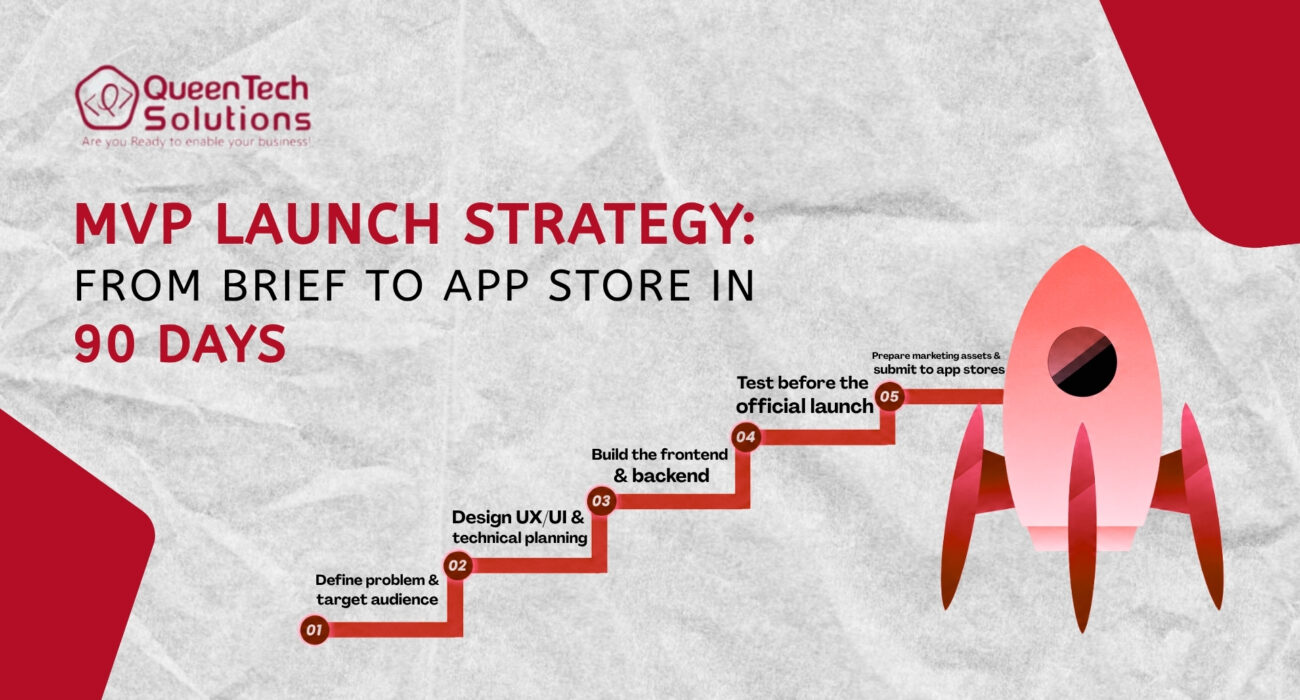
To hit the App Store in exactly three months, you must view your calendar as a series of high-stakes, non-negotiable phases. Each day must be accounted for, and the transition between phases must be seamless. This high-level breakdown ensures that the team – from developers to stakeholders – remains perfectly synchronized and prevents any single phase from bleeding into the next, which is the primary cause of launch delays.
- Days 1–15: Discovery & Planning: This is the research-heavy phase where you deep-dive into the market, interview potential users, and define the rigid scope of the project.
- Days 16–45: Design & Technical Planning: Here, you create the visual blueprint and the technical architecture, ensuring that the design is intuitive and the tech stack is scalable.
- Days 46–75: MVP Development: This is the core build phase where the frontend and backend are constructed simultaneously through agile sprints.
- Days 76–90: Testing, Submission & Soft Launch: The final sprint involves breaking the app through QA, fixing show-stopper bugs, and navigating the submission guidelines of the Apple App Store and Google Play Store.
Phase 1: Discovery & Strategy (Days 1–15)
The first two weeks of your MVP Launch Strategy determine the trajectory of the entire project.
5.1 Define the Core Problem
You must identify a real, burning pain point. Avoid “solution-in-search-of-a-problem” scenarios. If you can’t describe the problem in one sentence, your scope is too broad.
5.2 Target Audience & Competition
Who are your user personas? Conduct market segmentation to find the “early adopters.” Analyze both direct and indirect competitors to find gaps. If everyone is offering a complex subscription model, perhaps your gap is a “pay-as-you-go” simplicity.
5.3 Feature Prioritization
Use the MoSCoW framework (Must-have, Should-have, Could-have, Won’t-have). Anything that isn’t a “Must-have” is deleted from the 90-day scope. This results in a Product Brief, a clear scope document that defines goals and success metrics.
Phase 2: UX/UI Design & Technical Planning (Days 16–30)
Design is not just about how the app looks; it is fundamentally about how the app works and how it makes the user feel. This phase of the MVP Launch Strategy bridges the gap between a written brief and functional code, turning abstract ideas into tangible user flows.
- User Flow Mapping: You must map every single tap, swipe, and transition. If a user needs more than three taps to reach the core value proposition of your app, your design is too complex for an MVP.
- Wireframing & Prototyping: Start with low-fidelity sketches or “gray-box” wireframes to iterate on the logic quickly. Once the logic is sound, move to high-fidelity UI designs that focus on a clean, scalable interface over unnecessary animations or complex decorations.
- Tech Stack Selection: Decide between Native (iOS/Android) or Cross-platform (Flutter/React Native). For an MVP, cross-platform often wins because it allows you to build one codebase that serves two markets, significantly increasing speed to market.
- Sprint Planning: Adopt a strict Agile methodology. Break the remaining 60 days of development into two-week sprints with clear, demo-able deliverables at the end of each cycle.
Phase 3: MVP Development (Days 31–60)
This is the heavy-lifting phase where your MVP Launch Strategy moves from the drawing board into active, high-speed construction. This is where the vision becomes reality through code.
- Frontend & Backend Synchronization: While the frontend team builds the user-facing interface, the backend team must simultaneously handle the “plumbing”, APIs, databases, server-side logic, and user authentication.
- Essential Integrations: Focus only on the third-party services that are required for the app to function. This usually includes payment gateways like Stripe, notification services like Firebase, or essential analytics like Mixpanel.
- Continuous Testing & QA: Do not make the mistake of waiting until Day 61 to test the app. Developers should test every feature as soon as it is completed to catch and fix regressions in real-time, avoiding a catastrophic pile-up of bugs in the final weeks.
- Scalable Documentation: Even in a rush, maintain clear version control via GitHub and basic documentation. This ensures that when your MVP succeeds, the next team can scale the app without having to rewrite the entire codebase from scratch.
Phase 4: Testing & Pre-Launch Optimization (Days 61–75)
Quality Assurance (QA) is where your MVP Launch Strategy is battle-tested. This phase is about identifying the gap between how you thought the app would work and how it actually performs in the real world.
- Functional Testing: This is a systematic check of every button, link, and form field. Your goal is to identify and fix “show-stopper” bugs, those that cause crashes or prevent the user from completing the core task.
- Early User Testing: Bring in a small group of target users who have never seen the app before. Observe them as they attempt to use it without any instructions. Their points of confusion or frustration are your primary roadmap for the final week of optimization.
- Performance & Security Audits: Optimize the app for speed and responsiveness, as slow load times are the fastest way to lose a new user. Ensure that basic data protection and encryption are in place to comply with global privacy laws and App Store safety requirements.
Phase 5: Launch Preparation & Submission (Days 76–90)
The final push of your MVP Launch Strategy involves navigating the gatekeepers of the mobile world: the Apple App Store and Google Play Store. This phase is often the most stressful due to external approval timelines.
- App Store Optimization (ASO): Your app needs to be discoverable. Write a compelling title and description using high-intent keywords. Prepare professional, high-resolution screenshots and a brief demo video that highlights the core solution within the first five seconds.
- The Submission Process: Submit your app early in this window. Follow the guidelines for the Apple App Store and Google Play Store with extreme care. Common rejection reasons include simple things like broken links to a privacy policy or crashes on older devices, so double-check the basics.
- Soft Launch Strategy: Rather than a “Big Bang” global release, consider a “soft launch” in a specific geographic area or to a limited beta list. This allows you to collect initial performance data and fix any unforeseen issues before you spend your entire marketing budget on a wide release.
Post-Launch Strategy: Beyond the 90 Days
Once live, your MVP Launch Strategy transitions into a growth and iteration cycle.
- Monitor Performance: Track downloads, retention rates, and daily active users.
- Iterate Fast: Use the reviews and surveys you gather to fix issues. If users are complaining about a specific friction point, address it in the next sprint.
- Growth Planning: Identify which marketing channels (Social, Search, Influencers) are providing the lowest CAC (Customer Acquisition Cost) and prepare to scale.
Common Mistakes to Avoid
Even with a perfect 90-day plan, many founders stumble because of preventable errors. Being aware of these common killers of the MVP Launch Strategy is your best defense:
- Over-scoping the MVP: Trying to build a “unicorn” with twenty different features in three months. If it doesn’t solve the core problem, it doesn’t belong in the first 90 days.
- Ignoring Real User Feedback: Many founders build what they want rather than what the market is actually asking for. If your early testers hate a feature you love, dare to kill it.
- Delaying for Perfection: In the startup world, “perfect” is the enemy of “live.” If you aren’t slightly embarrassed by your first version, you likely launched too late and wasted valuable learning time.
- Poor Planning and “Spaghetti” Scope: Starting to write code before the Discovery phase is finished leads to endless rework and missed deadlines. Discipline in the first 15 days is what allows for speed in the remaining 75.
How Much Does an MVP Launch Strategy Cost?
The cost of launching an MVP in 90 days varies based on complexity and team location.
- Simple App: $15,000 – $30,000.
- Medium Complexity: $30,000 – $60,000.
- High Complexity: $70,000+.
The “Cost vs. Speed” trade-off is real. Hiring a specialized agency often costs more than a freelancer but drastically increases the likelihood of hitting the 90-day deadline with a polished product.
Conclusion
A successful MVP Launch Strategy is about discipline, not just talent. By following this 90-day roadmap, you move from a concept to a market-ready product that provides real-world validation. Speed allows you to fail fast or succeed faster, both of which save you time and money in the long run.
At Queen Tech Solutions (QTS), we specialize in helping founders navigate this 90-day journey. As the premier partner in high-performance App Development, QTS combines technical excellence with strategic marketing insights. Our experts don’t just build apps; they build businesses. Don’t let your idea sit on a shelf. Consult the SEO and development experts at QTS today. Start with a clear brief, build lean, launch fast, and iterate toward greatness.
Click Here to Reach out!
FAQ Section
- Can I really launch an MVP Launch Strategy in 90 days?
Yes, by strictly limiting the feature set to the “core value proposition” and using agile development cycles, a 90-day launch is standard for professional teams.
- What features should an MVP include?
Only the features that solve the primary problem for your user. Anything else is a distraction that should be moved to “Phase 2.”
- How do I validate my MVP idea?
Through pre-launch landing pages, user interviews, and finally, by measuring engagement and retention once the app is live on the App Store.