
 Jasmin Reda
Navigating the headless CMS vs traditional CMS debate has become a critical strategic decision in the rapidly evolving digital landscape of 2026, far exceeding a simple technical choice for your corporate website. For over two decades, the “Monolithic” or traditional approach to content management dominated the web, providing an all-in-one solution for creating, storing, and displaying content. However, as consumer behavior shifts toward omnichannel experiences and the demand for ultra-fast performance increases, choosing between these two architectures has moved to the forefront of modern digital transformation strategies.
Businesses today need websites that are not only aesthetically pleasing but also lightning-fast, highly scalable, and capable of delivering content to multiple platforms simultaneously, including mobile apps, smart devices, and IoT kiosks. While traditional CMS platforms like WordPress continue to power a significant portion of the internet, headless architecture is rapidly gaining adoption among enterprise-level organizations and tech-forward startups. When weighing a headless CMS vs traditional CMS, the core decision for business owners and CTOs is no longer about which software brand to use, but which fundamental architecture – decoupled or monolithic – will support their growth over the next decade. Should your business stick with the proven, user-friendly nature of a traditional system, or embrace the flexibility and performance of a headless ecosystem? This guide explores the strategic nuances of the headless CMS vs traditional CMS debate to help you determine the best fit for your digital future.
What Is a Traditional CMS? The Monolithic Side of the Headless CMS vs Traditional CMS Debate
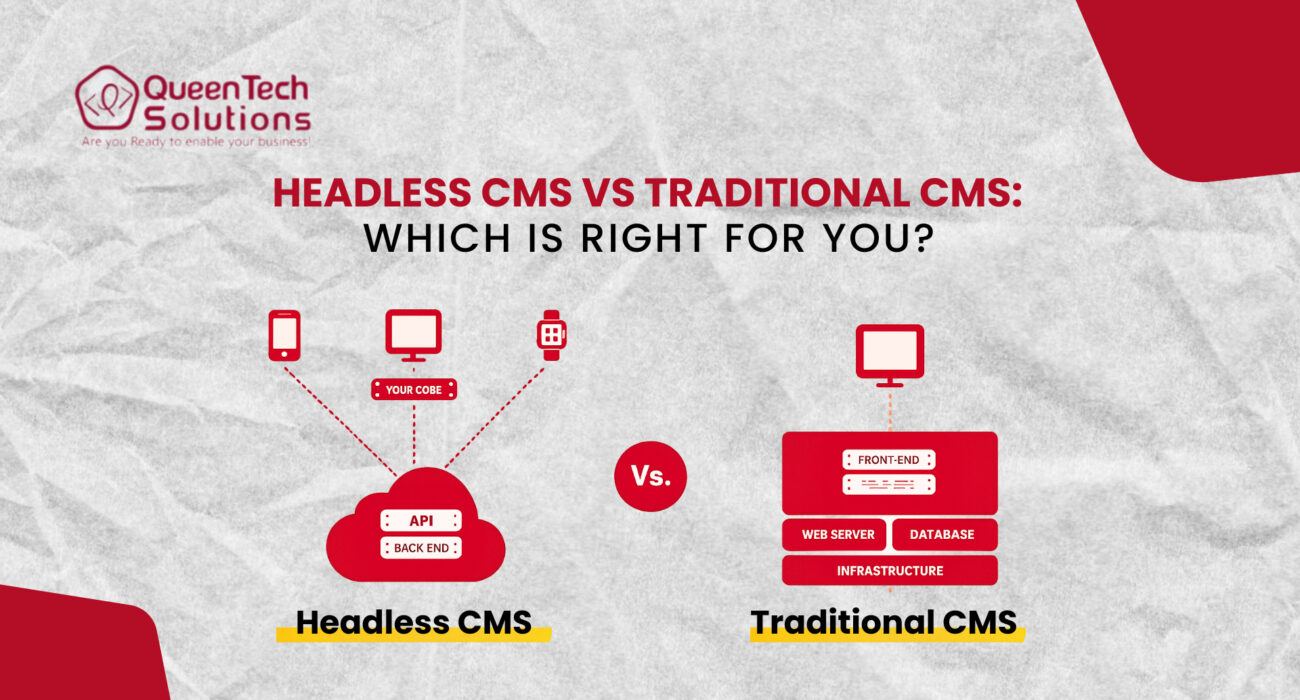
To understand the modern shift in website architecture, we must first define the traditional Content Management System (CMS). A traditional CMS is often referred to as a “monolithic” system because the backend (where content is created and stored) and the frontend (the “head” or the visual layer the user sees) are tightly connected and inseparable.
How Traditional Architecture Works
In a traditional setup, the CMS handles everything. When a user visits your website, the CMS pulls content from its database, pushes it through a template or theme, and renders the HTML directly in the user’s browser. The content creation tools, the database, and the visual design layer are all bundled into a single software package. Understanding this monolithic setup is crucial to evaluating the core differences of a headless CMS vs traditional CMS.
WordPress
WordPress is the undisputed king of traditional CMS platforms. Its massive market dominance is due to its vast plugin ecosystem and user-friendly interface. It allows non-technical marketing teams to manage websites with ease, making it the go-to choice for millions of business websites globally.
Joomla
Joomla offers a middle ground between the simplicity of WordPress and the complexity of Drupal. It provides a community-driven structure with more advanced user-management features and flexibility out of the box, though it requires a slightly higher technical barrier to entry.
Drupal
Drupal is the “Enterprise” choice among traditional platforms. It is known for its high level of customization and robust security features. While it is still a monolithic system, its ability to handle complex data structures makes it a favorite for government and large-scale corporate portals.
Advantages of Traditional CMS
- Faster Initial Deployment: Since the frontend and backend are already connected, you can launch a site quickly using pre-made themes.
- Lower Technical Barrier: Marketing teams can manage the layout and content without needing a frontend developer for every change.
- Cost-Effective for Small Scales: Lower initial development investment makes it ideal for SMEs.
What Is a Headless CMS? Architecture and How It Works
A headless CMS is essentially a content repository that is “decoupled” from the presentation layer. In this architecture, the “head” (the frontend) is chopped off from the “body” (the backend). When reviewing a headless CMS vs traditional CMS, this structural separation is the defining differentiator.
API-Based Architecture
Unlike a traditional system that forces you to use its specific rendering engine, a headless CMS delivers content via APIs (Application Programming Interfaces). This means your content exists as pure data—usually in JSON format—which can be pulled into any device or frontend framework.
How Headless CMS Works
- Content Repository: You create and organize your content in a backend interface, similar to a traditional CMS.
- APIs: The content is made available through a secure API endpoint.
- Frontend Independence: Developers build a completely separate frontend using modern frameworks like React, Vue, or Next.js.
- Omnichannel Delivery: Because the content is just data, it can be sent to a website, a mobile app, a smartwatch, or even a digital billboard simultaneously.
Popular Headless CMS Platforms
Several platforms have emerged as leaders in this space, including:
- Contentful: Known for its enterprise-level features and modular content modeling.
- Strapi: A popular open-source headless CMS that gives developers full control over the backend.
- Sanity: Focused on real-time collaboration and highly customizable content structures.
Strategic Insight: Headless CMS is not “better” by default; it is a specialized tool. In the balance of a headless CMS vs traditional CMS, while headless offers unparalleled flexibility, it also requires a more sophisticated development team to manage the separate frontend layer.
Performance: Headless CMS vs Traditional CMS Speed Comparison
In the age of Google’s Core Web Vitals, website speed is no longer just about user experience—it is a critical SEO ranking factor. When comparing a headless CMS vs traditional CMS, the performance gap is often the deciding factor for high-growth businesses.
Why Headless Often Performs Better
Headless architecture thrives on “Static Site Generation” (SSG). Instead of the server building the page every time a user clicks a link (which happens in traditional CMS), a headless site can be “pre-built.” These static pages are then distributed across a Content Delivery Network (CDN), meaning the user downloads the content from the server closest to them. Because there is no heavy database processing happening at the moment of the click, the site feels instantaneous.
Traditional CMS Performance Challenges
Traditional monolithic systems are often burdened by “bloat.” To add features, users install plugins. Each plugin adds its own scripts and database calls. When a page loads, the server must process all these requests simultaneously, which can lead to “bottlenecks.” While a well-optimized WordPress site can still be fast, it requires constant maintenance to stay that way as the site grows.
Important Balance
It is important to note that performance is not exclusive to headless. A traditional CMS can be optimized with advanced caching and premium hosting to meet high standards. However, looking at a headless CMS vs traditional CMS setup, headless architecture provides a “cleaner” path to top-tier performance for complex, high-traffic ecosystems.
Content Flexibility: Where Headless CMS Wins
The true power of a headless system lies in its ability to handle omnichannel content management. In the comparison of a headless CMS vs traditional CMS, your content in a traditional setup is often “trapped” within the website’s layout. If you want to use that same content for a mobile app, you often have to copy and paste it or build complex workarounds.
Omnichannel Publishing
With a headless CMS, your content is a “Single Source of Truth.” If you change a product description in the CMS, that change is instantly updated on your website, your iOS app, your Android app, and your in-store digital signage. Analyzing a headless CMS vs traditional CMS workflow highlights how this eliminates the operational friction of managing multiple platforms.
Frontend Freedom
Developers are no longer restricted by the “theming” engine of the CMS. In the headless CMS vs traditional CMS battle, developers prefer headless because it allows them to use modern tools like React or Vue.js. This freedom allows for the creation of highly interactive, “App-like” web experiences that are difficult to achieve within the confines of a traditional template.
Developer Experience and Maintenance Costs
When evaluating website architecture, businesses must consider the long-term maintenance and the skill set of their team. The breakdown of a headless CMS vs traditional CMS path reveals drastically different resource requirements.
Traditional CMS Maintenance
- Pros: It is generally easier to find developers who know WordPress or Drupal. Maintenance often involves “one-click” updates for the core software and plugins.
- Cons: These systems are high-value targets for hackers. Because the frontend and backend are connected, a vulnerability in a single plugin can compromise the entire database.
Headless CMS Maintenance
- Pros: Security is significantly improved because the backend is hidden behind an API. Even if the frontend is attacked, the content repository remains secure. Architecture is cleaner, making it easier to swap out technologies in the future without rebuilding the whole site.
- Cons: Maintenance is more complex. You are essentially managing two separate systems (the CMS and the frontend application). This requires a more specialized – and often more expensive – team of engineers.
When to Choose Traditional CMS (Practical Business Cases)
Despite the hype surrounding headless technology, a traditional monolithic CMS is still the superior choice for a large percentage of businesses when evaluating a headless CMS vs traditional CMS framework.
- Small Businesses & Startups: If you need to get a site live in two weeks on a modest budget, a traditional CMS like WordPress is unbeatable.
- Content-Heavy Blogs & News Portals: If your primary goal is publishing articles and you don’t need to push that content to mobile apps or IoT devices, the built-in SEO and drafting tools of a traditional CMS are highly efficient.
- Marketing-Led Teams: If your marketing team needs to build landing pages and change layouts on the fly without waiting for a developer’s sprint, the “What You See Is What You Get” (WYSIWYG) editors of traditional platforms are essential.
When to Choose Headless CMS (Enterprise & Multi-Channel Cases)
For organizations undergoing deep digital transformation, looking at a headless CMS vs traditional CMS infrastructure often makes headless architecture the only way to meet modern demands.
Enterprise Scalability
Large organizations with complex infrastructure benefit from the separation of concerns. If the marketing team wants to change the CMS, they can do so without breaking the frontend. If the tech team wants to upgrade the frontend framework, the content remains untouched.
Mobile-First and SaaS Products
If your website is just one part of a larger digital product (like a SaaS platform with a web app and a mobile app), a headless CMS allows you to manage all product documentation and marketing copy in one place.
Future-Proofing
Technologies change. In five years, React might be replaced by something better. In the context of a headless CMS vs traditional CMS, headless wins on longevity; you can simply build a new frontend and connect it to your existing API. You never have to do a “full migration” of your content again.
Cost Comparison and QTS’s Recommendation
The financial comparison of a headless CMS vs traditional CMS roadmap is rarely a direct “apples-to-apples” scenario.
Traditional CMS Costs:
- Lower initial setup fees.
- Inexpensive hosting options.
- Higher long-term costs in “technical debt” if the site becomes over-customized.
Headless CMS Costs:
- Higher upfront development and architectural design costs.
- Infrastructure costs for API calls and specialized hosting (like Vercel or Netlify).
- Lower long-term “rebuild” costs because the content is decoupled.
The QTS Strategic Recommendation
At Queen Tech Solutions (QTS), we believe that the “cheapest” option is the one that aligns with your three-year growth plan. We help our clients evaluate their technical needs through a rigorous headless CMS vs traditional CMS audit.
If your goal is a high-performance, multi-platform ecosystem that serves thousands of concurrent users across the globe, we recommend a headless approach. However, if you need a robust corporate website that empowers your marketing team to move fast, we leverage our 18+ years of expertise in platforms like WordPress or Drupal to build a high-performance monolithic site. Our goal is to build scalable digital ecosystems that reduce operational friction and support your business goals.

Conclusion
In the debate of headless CMS vs traditional CMS, there is no single “correct” answer. The right architecture depends entirely on your business goals, your team’s technical maturity, and your budget for long-term scalability.
Traditional CMS platforms remain a powerful, efficient, and user-friendly choice for businesses that prioritize ease of use and rapid deployment. On the other hand, headless architecture offers the performance, security, and omnichannel flexibility required for the enterprise digital experience of the future.
Choosing your website’s architecture is a foundational step in your digital strategy. We encourage you to think long-term when evaluating a headless CMS vs traditional CMS framework: where will your business be in five years? Will you need an app? Will you need to scale to new markets?
Consult with an experienced development partner like QTS to audit your requirements and build a solution that serves as a launchpad for your success.
Frequently Asked Questions About Headless CMS vs Traditional CMS
- What is the difference between headless CMS and traditional CMS?
A traditional CMS bundles the content management and the visual layer together. A headless CMS separates them, delivering content via APIs to any frontend.
- Is headless CMS better for SEO?
When analyzing a headless CMS vs traditional CMS for search visibility, headless can be better for SEO because of its superior speed and performance (Core Web Vitals). However, it requires more manual SEO setup compared to the “out-of-the-box” plugins of a traditional CMS.
- When should a business use a headless CMS?
A business should opt for a headless solution when they need to deliver content to multiple platforms (web, app, IoT), require top-tier performance, or want a highly customized user experience.
- Is WordPress considered a traditional CMS?
Yes. Though it can be used “headlessly” through the WordPress REST API, it is fundamentally designed as a traditional monolithic CMS.
- Does headless CMS cost more?
Generally, yes. In the financial comparison of a headless CMS vs traditional CMS, the initial development cost for headless is higher because you are building a custom frontend from scratch, but it can be more cost-effective in the long run for large-scale enterprises.
- Which CMS architecture is best for enterprise websites?
When comparing a headless CMS vs traditional CMS for enterprise needs, headless is increasingly preferred due to its security, scalability, and ability to support digital transformation across multiple channels.